
CHARGEUR 5 CD ACOUSTIC WAVE MUSIC SYSTEM II - Audio System BOSE - Free user manual and instructions
Find the device manual for free CHARGEUR 5 CD ACOUSTIC WAVE MUSIC SYSTEM II BOSE in PDF.


| Product Type | 5 CD Changer for Acoustic Wave® Music System II |
| Brand | Bose |
| Model | 5 CD CHARGER ACOUSTIC WAVE MUSIC SYSTEM II |
| Dimensions (W x H x D) | 38.7 x 21.1 x 45.7 cm |
| Weight | 3.1 kg |
| Power Supply | 220-240 V~, 50/60 Hz, 80 W (max combined with the system) |
| Changer Capacity | Up to 5 audio CDs |
| Auxiliary Inputs | 2 (AUX 1 and AUX 2) on RCA connectors |
| Remote Control | Infrared, range 6 m, battery CR2032/DL2032 |
| Main Functions | Play, pause, stop, next/previous track, search, disc selection, repeat and shuffle modes |
| Compatibility | Acoustic Wave® Music System II |
| Laser Class | Class 1 laser product |
| Standards | FCC Class B, CE, ICES-003 Class B |
| Housing Material | Plastic, graphite gray or platinum white finish |
| Operating Temperature | 0 to 40 °C (estimated) |
| Included Accessories | Remote control, power cord, auxiliary input cable (2 RCA), user manual |
| Maintenance and Cleaning | Unplug before cleaning; use a soft dry cloth. Do not use liquid products. |
| Spare Parts | Remote control battery (CR2032/DL2032), power cord (reference at service center) |
| Repairability | Entrust any repair to qualified personnel. Do not disassemble yourself. |
| Warranty | 2 years (1 year for Europe) parts and labor |
| Customer Service | Contact Bose for assistance or repair |
Frequently Asked Questions - CHARGEUR 5 CD ACOUSTIC WAVE MUSIC SYSTEM II BOSE
User questions about CHARGEUR 5 CD ACOUSTIC WAVE MUSIC SYSTEM II BOSE
0 question about this device. Answer the ones you know or ask your own.
Ask a new question about this device
Download the instructions for your Audio System in PDF format for free! Find your manual CHARGEUR 5 CD ACOUSTIC WAVE MUSIC SYSTEM II - BOSE and take your electronic device back in hand. On this page are published all the documents necessary for the use of your device. CHARGEUR 5 CD ACOUSTIC WAVE MUSIC SYSTEM II by BOSE.
USER MANUAL CHARGEUR 5 CD ACOUSTIC WAVE MUSIC SYSTEM II BOSE
Acoustic Wave® II CD Changer
Owner's Guide
Bedienungsanleitung
Please read this owner's guide
Please take the time to follow the instructions in this owner's guide carefully. It will help you set up and operate your system properly and enjoy all of its advanced features. Please save this owner's guide for future reference.
WARNING: To reduce the risk of fire or electrical shock, do not expose the product to rain or moisture.
WARNING: The apparatus shall not be exposed to dripping or splashing, and objects filled with liquids, such as vases, shall not be placed on the apparatus. As with any electronic products, use care not to spill liquids into any part of the system. Liquids can cause a failure and/or a fire hazard.
CAUTION: To reduce the risk of electric shock, do not disassemble this product unless you are qualified. Refer servicing to quali- fied service personnel.
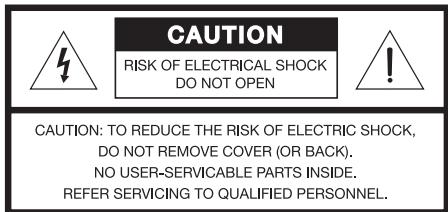

The lightning flash with arrowhead symbol within an equilateral triangle alerts the user to the presence of uninsulated, dangerous voltage within the system enclosure that may be of sufficient magnitude to constitute a risk of electrical shock.

The exclamation point within an equilateral triangle, as marked on the system, is intended to alert the user to the presence of important operating and maintenance instructions in this owner's guide.
Class B emissions
This Class B digital apparatus meets all requirements of the Canadian Interference-Causing Equipment Regulations (Canada only).
CAUTION: To prevent electric shock, match the wide blade of the line cord plug to the wide slot of the AC (mains) receptacle. Insert fully.
CAUTION: Use of controls or adjustments or performance of procedures other than those specified herein may result in hazardous radiation exposure. The compact disc player should not be adjusted or repaired by anyone except properly qualified service personnel.
CAUTION: Make no modifications to the system or accessories. Unauthorized alterations may compromise safety, regulatory compliance, and system performance.
Class 1 laser product
This CD player is classified as a CLASS 1 LASER PRODUCT according to EN 60825-1:1994+A1+A2, IEC 60825-1:1993+A1+A2.
WARNING: Keep the remote control battery away from children. It may cause a fire or chemical burn if mishandled. Do not recharge, disassemble, heat above 100^ (212°F), or incinerate. Dispose of used batteries promptly. Replace only with a battery of the correct type and model number.
WARNING: Danger of explosion if battery is incorrectly replaced. Replace only with Duracell, Eveready, Energizer, Maxell, Toshiba, or Shun Wo CR2032 or DL2032 3-volt lithium battery.

Please dispose of used batteries properly, following any local regulations. Do not incinerate.
WARNING: No naked flame sources, such as lighted candles, should be placed on the apparatus.
Note: Where the mains plug or appliance coupler is used as the disconnect device, such disconnect device shall remain readily operable.
This product conforms to the EMC Directive 89/336/EEC and to the Low Voltage Directive 73/23/EEC. The complete Declaration of Conformity can be found at www.bose.com/static/compliance/index.html.
- Read these instructions – for all components before using this product.
- Keep these instructions – for future reference.
- Heed all warnings – on the product and in the owner's guide.
- Follow all instructions.
- Do not use this apparatus near water or moisture - Do not use this product near a bathtub, washbowl, kitchen sink, laundry tub, in a wet basement, near a swimming pool, or anywhere else that water or moisture are present.
- Clean only with a dry cloth – and as directed by Bose Corporation. Unplug this product from the wall outlet before cleaning.
- Do not block any ventilation openings. Install in accordance with the manufacturer's instructions – To ensure reliable operation of the product and to protect it from overheating, put the product in a position and location that will not interfere with its proper ventilation. For example, do not place the product on a bed, sofa, or similar surface that may block the ventilation openings. Do not put it in a built-in system, such as a bookcase or a cabinet that may keep air from flowing through its ventilation openings.
- Do not install near any heat sources, such as radiators, heat registers, stoves or other apparatus (including amplifiers) that produce heat.
- Do not defeat the safety purpose of the polarized or grounding-type plug. A polarized plug has two blades with one wider than the other. A grounding-type plug has two blades and a third grounding prong. The wider blade or third prong are provided for your safety. If the provided plug does not fit in your outlet, consult an electrician for replacement of the obsolete outlet.
- Protect the power cord from being walked on or pinched, particularly at plugs, convenience receptacles, and the point where they exit from the apparatus.
- Only use attachments/accessories specified by the manufacturer.
- Use only with the cart, stand, tripod, bracket or table specified by the manufacturer or sold with the apparatus. When a cart is used, use caution when moving the cart/apparatus combination to avoid injury from tip-over.
-
Unplug this apparatus during lightning storms or when unused for long periods of time – to prevent damage to this product.
-
Refer all servicing to qualified service personnel. Servicing is required when the apparatus has been damaged in any way: such as power-supply cord or plug is damaged; liquid has been spilled or objects have fallen into the apparatus; the apparatus has been exposed to rain or moisture, does not operate normally, or has been dropped – Do not attempt to service this product yourself. Opening or removing covers may expose you to dangerous voltages or other hazards. Please call Bose to be referred to an authorized service center near you.
- To prevent risk of fire or electric shock, avoid overloading wall outlets, extension cords, or integral convenience receptacles.
- Do not let objects or liquids enter the product – as they may touch dangerous voltage points or short-out parts that could result in a fire or electric shock.
- See product enclosure bottom for safety related markings.
Information about products that generate electrical noise
If applicable, this equipment has been tested and found to comply with the limits for a Class B digital device, pursuant to Part 15 of the FCC rules. These limits are designed to provide reasonable protection against harmful interference in a residential installation. This equipment generates, uses, and can radiate radio frequency energy and, if not installed and used in accordance with the instructions, may cause harmful interference to radio communications. However, this is no guarantee that interference will not occur in a particular installation. If this equipment does cause harmful interference to radio or television reception, which can be determined by turning the equipment off and on, you are encouraged to try to correct the interference by one or more of the following measures:
- Reorient or relocate the receiving antenna.
- Increase the separation between the equipment and receiver.
- Connect the equipment to an outlet on a different circuit than the one to which the receiver is connected.
- Consult the dealer or an experienced radio/TV technician for help.
Note: Unauthorized modification of the receiver or radio remote control could void the user's authority to operate this equipment.
This product complies with the Canadian ICES-003 Class B specifications.
- Use Proper Power Sources - Plug the product into a proper power source, as described in the operating instructions or as marked on the product.
- Avoid Power Lines – Use extreme care when installing an outside antenna system to keep from touching power lines or circuits, as contact with them may be fatal. Do not install external antennas near overhead power lines or other electric light or power circuits, nor where an antenna can fall into such circuits or power lines.
- Ground All Outdoor Antennas – If an external antenna or cable system is connected to this product, be sure the antenna or cable system is grounded. This will provide some protection against voltage surges and built-up static charges.
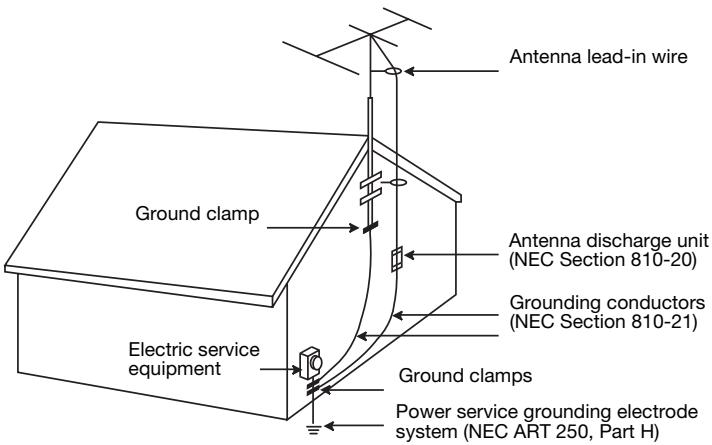
Section 810 of the National Electrical Code ANSI/NFPA No. 70 provides information with respect to proper grounding of the mast and supporting structure, grounding of the lead-in wire to an antenna discharge unit, size of grounding conductors, location of antenna-discharge unit, connection to grounding electrodes, and requirements for the ground electrode. Refer to the antenna grounding illustration on this page.
Antenna grounding
Example of antenna grounding as per National Electrical Code, ANSI/NFPA 70.
Note to CATV system installer
This reminder is provided to call the CATV system installer's attention to Article 820-40 of the NEC (of USA) that provides guidelines for proper grounding. In particular, it specifies that the cable ground shall be connected to the grounding system of the building, as close to the point of cable entry as is practical.
Setting Up Your Acoustic Wave® II CD Changer 4
Features and benefits of the Acoustic Wave II CD changer 4
Unpacking the carton 4
Selecting a location for your music system and changer 5
Seating your Acoustic Wave® music system II on the CD changer 5
Making the connections 6
7
Using the remote control 7
Using the Acoustic Wave II CD changer control panel 8
Turning your system on or off 8
Loading/unloading discs into the CD changer 9
Selecting the CD player or CD changer 9
Playing CDs in the CD changer 10
Listening to an External Audio Source 11
Connecting an external audio source 11
Playing a connected audio source 12
Care and Maintenance 13
Replacing the remote control battery 13
Troubleshooting 14
Customer Service 14
Limited warranty 15
Technical Information 15
Features and benefits of the Acoustic Wave® II CD changer
Thank you for selecting the Bose® Acoustic Wave® II CD changer accessory. Combining this product with your Acoustic Wave® music system II provides you with some valuable benefits:
- A six-disc music system - One disc player in the Acoustic Wave® music system II plus five additional disc slots in the Acoustic Wave® II CD changer allows you to load and play up to six audio CDs, providing hours of uninterrupted CD music.
- *Elegant integrated pedestal design - Using the same table-top space as the Acoustic Wave® music system II, the CD changer complements the elegance and simplicity of the system.
- One integrated remote control - Provides the simplicity of using one remote control and one-touch selection of all built-in sources.
- Multiple source switching - Using the rear-panel auxiliary (AUX) input jacks, you can enjoy listening to one or two other audio sources in your home through the Acoustic Wave® music system II.
Unpacking the carton
Carefully unpack your Acoustic Wave® II CD changer. Save all packing materials for possible future use. The original packing materials provide the safest way to transport your new multi-disc changer.
Check to be sure you received both parts identified in Figure 1. If either part appears to be damaged, do not attempt to use it. Notify Bose Customer Service immediately (see phone numbers on the inside back cover).
WARNING: To avoid danger of suffocation, keep the plastic bags out of the reach of children.
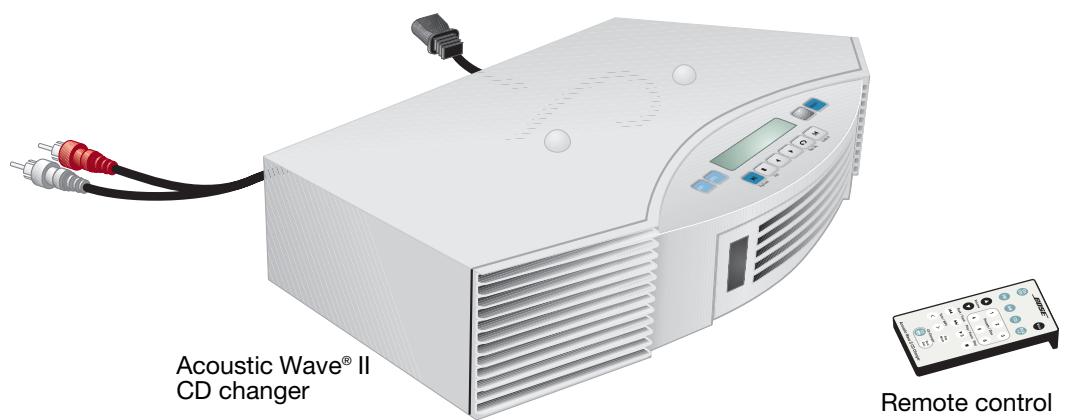
Figure 1
Carton contents
For your records
Now is a good time to record the serial number of your Acoustic Wave® II CD changer here and on your product registration card. The serial number is located on the back panel.
Serial number:
Purchase date:
We suggest you keep your sales receipt and a co
Selecting a location for your music system and changer
The Acoustic Wave® II CD changer is designed to fit under your Acoustic Wave® music system II. Before you connect the two, however, select a good location for the stacked units.
When choosing the location, remember that the tonal quality of your Acoustic Wave® music system II, as with any high-performance sound system, will vary with room placement.
Feel free to try different locations, but keep the following guidelines in mind:
- The Acoustic Wave® music system II is designed to sound best when placed on a shelf, counter, desk, or table top, 30 to 48 inches (75 to 120 cm) from the floor.
- The CD player in the Acoustic Wave® music system II needs an allowance of several inches for the CD cover on top of the music system to open.
- The Acoustic Wave® music system II should be near the center of a wall and 6 inches (15 cm), or less, away from the wall.
- To increase the bass response, move the unit toward any corner of the room; to decrease bass response, move it away from the corner.
Seating your Acoustic Wave® music system II on the CD changer
With the CD changer in your chosen location, carefully set your Acoustic Wave® music system II on top of the CD changer (Figure 2a).
- Make sure the Acoustic Wave® music system II fits onto the raised guides on top of the CD changer.
- Make sure the Acoustic Wave® music system II sits flat and the side edges of both units are aligned.
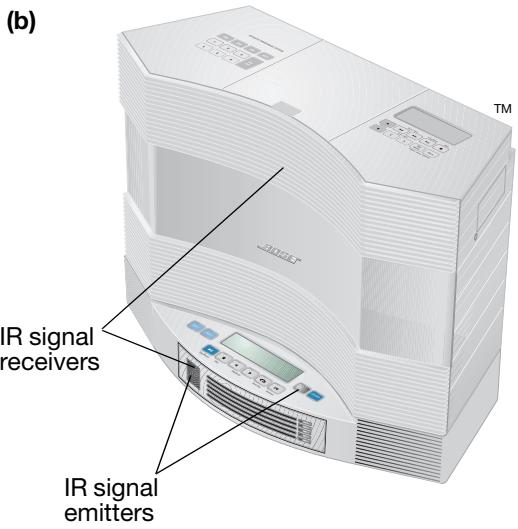
- Make sure there is a clear optical path in front of the unit to allow the infrared emitters and receivers to communicate (Figure 2b).
Seating the Acoustic Wave® music system on the CD changer
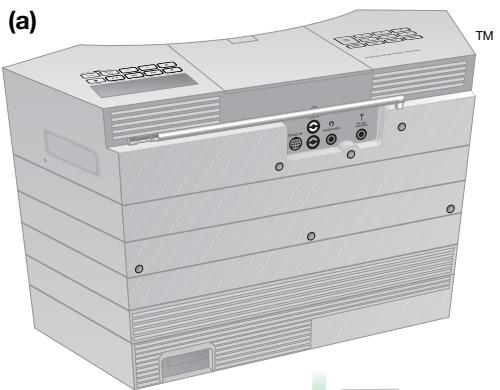
Figure 2
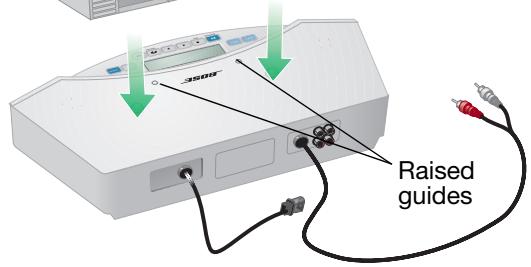
Making the connections
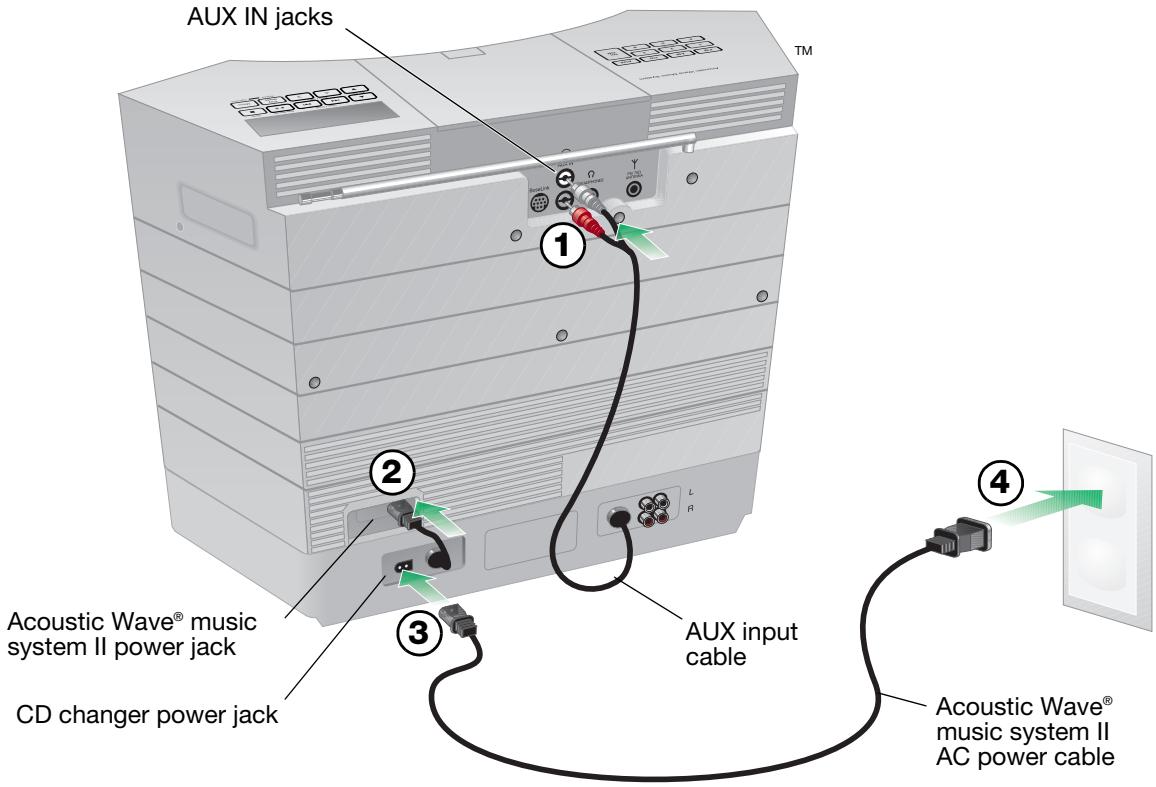
Before you start this setup procedure, disconnect the AC power cord on your Acoustic Wave® music system II and set it aside. You will need to use it again in Step 3.
On the back of the CD changer there are two cables that connect to your Acoustic Wave® music system II.
- Insert the two connectors of the AUX input cable into AUX IN jacks on the back of the music system (Figure 3). Be sure to match the colors of the connectors and jacks: red to red, and white to white.
- Plug the attached CD changer power cord into the AC power jack on the back of the music system.
- Plug the small end of the power cord into the power jack on the back of the CD changer.
- Plug the other end of the power cord into an AC (mains) wall outlet.
After applying power, "PLEASE WAIT" appears on the display for about 30 seconds while the system prepares itself for operation. DO NOT insert any discs until this message disappears.
Figure 3
Connecting cables and power cords
Using the remote control
The remote control included with your Acoustic Wave® II CD changer allows you to control functions of both the CD changer and your Acoustic Wave® music system II. Therefore, you only need this remote to control your system. Just aim the remote at the system and press the buttons. The remote normally works within 20 feet of the front panel.
If the remote stops operating or its range seems reduced, it may be time to replace the battery. For instructions, refer to "Replacing the remote control battery" on page 13.
The information in Figure 4 describes the buttons used for playing CDs and selecting auxiliary inputs. For controlling other functions of the Acoustic Wave® music system II, see the owner's guide that came with it.
Notes:
- Press-and-hold operations require holding the button down for at least one second.
- Pressing FM, AM, CD, or AUX automatically turns on the system to the source selected.
- The remote can select an external audio source that is connected to the changer, but cannot turn the source on or off or change its settings.
Acoustic Wave® II CD changer remote control
On/Off
Turns the system on or off (page 8).
CD
Selects the CD source in the Acoustic Wave® music system II (page 9).
Seek/Track
Skipping to next/previous CD track (page 10).
Tune/MP3
Scans forward/backward through a CD track (page 10).
Figure 4
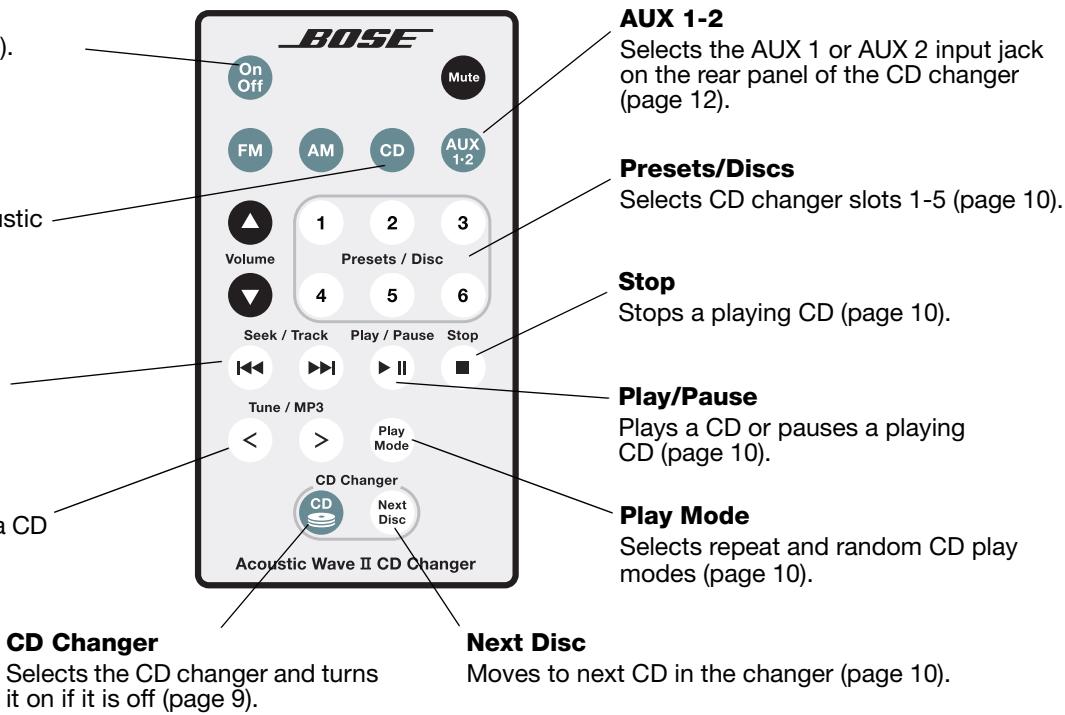
Throughout this owner's guide, you will see button icons to the left of the operating instructions. These icons refer to buttons located on the remote control.
Using the Acoustic Wave® II CD changer control panel
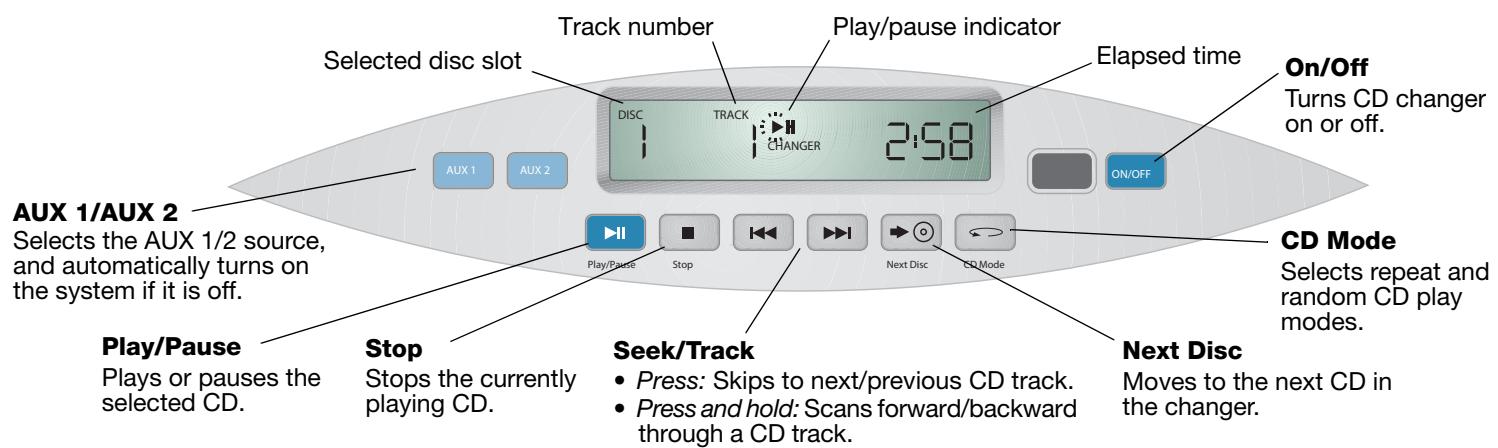
The Acoustic Wave® II CD changer control panel provides playback control buttons and a display for operating the changer only. It cannot control any functions of the Acoustic Wave® music system II. Figure 5 describes the control buttons and display window.
CD changer control buttons and display functions
Figure 5
Power on/off controls of the complete system
Turning your system on or off
To turn on the complete system, press On/Off on the CD changer control panel or press the changer select button CD on the remote. For other power on/off controls, see Figure 6.
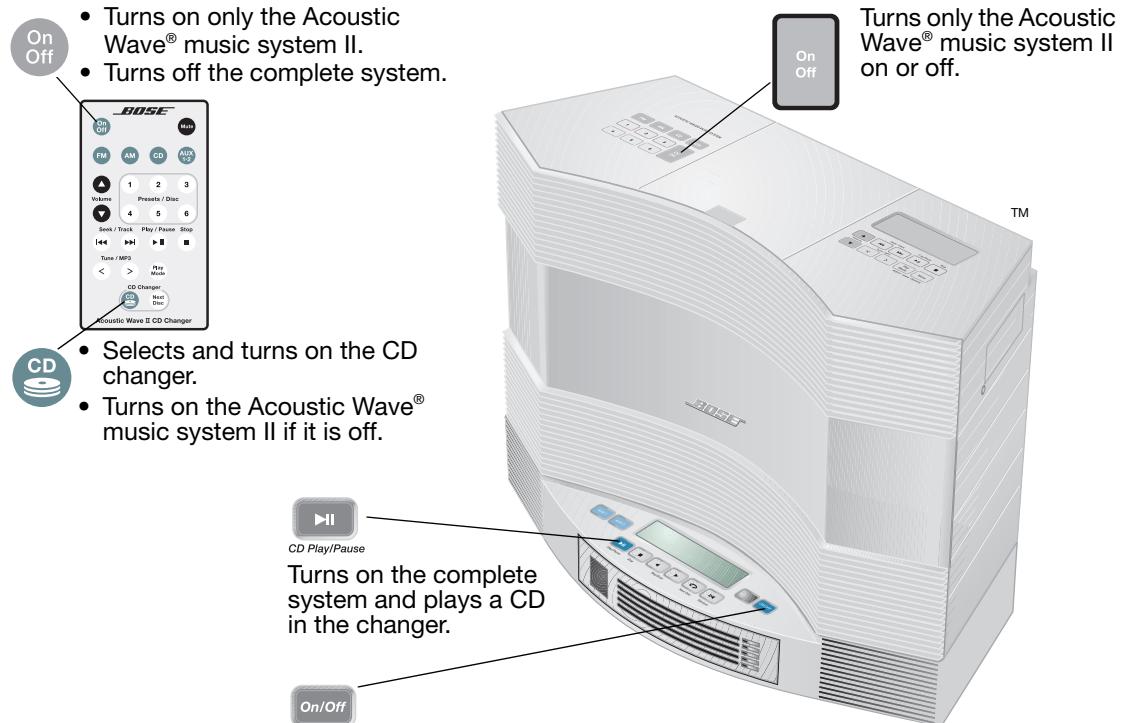
Figure 6
Turns on the complete system and switches the Acoustic Wave® music system II to the AUX source.
- Only turns off the CD changer.
Loading/unloading discs into the CD changer
The Acoustic Wave® II CD changer hold up to five CDs. When a CD is inserted into a slot in the changer and it is on, the changer's display window indicates the number of the CD slot selected, the track number playing, and the elapsed time (see Figure 5).
To load a CD into the changer, insert one edge of the disc into an empty slot and push the disc all the way in (Figure 7). The LED indicator to the right of each slot indicates the status.
Loading discs
Figure 7
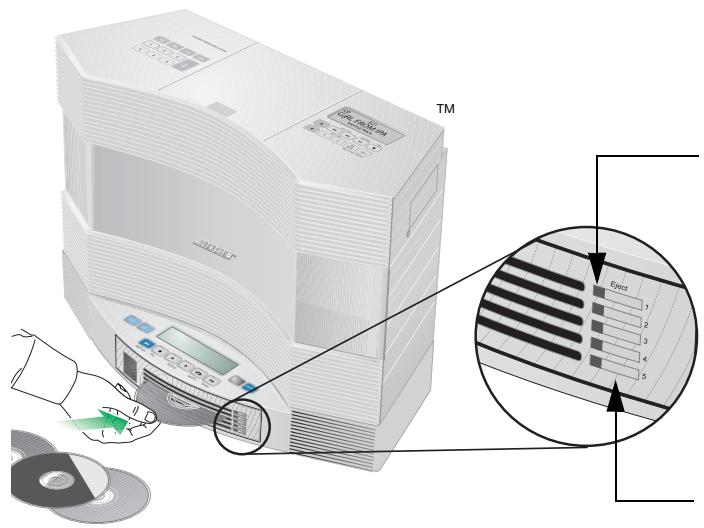
Disc slot status indicators
- Off............................................Empty disc slot.
- Amber.... The slot contains a CD, but it is not currently selected. The amber light flashes while a slot is ejecting a disc.
- Green..... The current disc slot.
The green light flashes while the changer switches to this slot.
Disc slot eject buttons
To remove a CD from a changer slot, press the Eject button to the right of the status indicator for that slot. Allow a few seconds for the mechanism to respond.

CAUTION:
- DO NOT INSERT mini CDs or non-circular CDs into any disc slot. The CD changer may not properly play or eject them.
- DO NOT INSERT more than one disc at a time into any disc slot.
- Doing either of the above can cause damage to the disc and/or the CD changer.
Selecting the CD player or CD changer
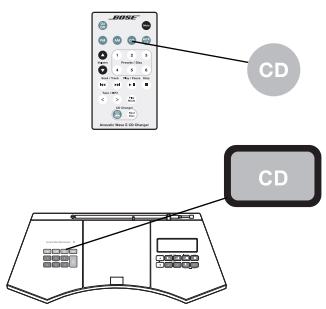
Using the Acoustic Wave® II CD changer provides access to up to six CDs, one in the Acoustic Wave® music system II and five in the CD changer.
To use the Acoustic Wave® music system II CD player:
Press CD on the remote control or on the Acoustic Wave® music system II control panel to turn on (if off) the Acoustic Wave® music system II and select the CD player.
For complete instructions on operating the CD player, refer to your Acoustic Wave® Music System II Owner's Guide.
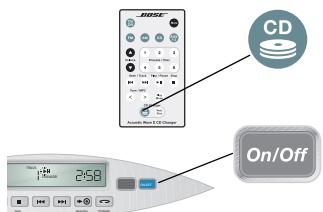
To use the Acoustic Wave II CD changer:
Press CD changer on the remote control, or press On/Off on the CD changer control panel to turn on (if off) the complete system and select the CD changer.
Playing CDs in the CD changer
Play/Pause
- Press Play/Pause to start playing the selected CD. Press again to pause it. While a CD is playing, the display tells you the disc slot number, track number, and elapsed time.
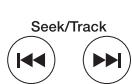
- Press Seek/Track once to skip to the beginning of the current track. Press again within three seconds to skip to the beginning of the previous track.
- Press Seek/Track once to skip to the next track.
- Press and hold Tune/MP3 < or Tune/MP3 > to quickly scan backward or forward through a track.

- Press Stop to stop the currently playing CD.

- Press Next Disc to move to the next disc slot. The disc slot number on the display tells you which slot is currently selected.
OR
- Press Preset/Disc 1-5 to move to a specific disc slot.

Press Play Mode repeatedly until the play mode you want is displayed.
| Displayed mode | Description |
| REPEAT ALL | Repeats all tracks and discs in numerical order. |
| REPEAT ALL RANDOM | Repeats all tracks and discs in random order. |
| REPEAT DISC | Repeats all tracks on selected disc in numerical order. |
| REPEAT DISC RANDOM | Repeats all tracks on selected disc in random order. |
Connecting an external audio source
The Acoustic Wave® II CD changer provides two rear-panel inputs (AUX 1 and AUX 2) for connecting external audio devices such as a TV, VCR, DVD player, cassette player, or MP3 player. This gives you the advantage of hearing Acoustic Wave® music system II sound from a range of sources.
To make the connection, use an appropriate stereo cable (not included).
- Connect one end of the cable to the audio output jacks of the device and the other end to one set of AUX input jacks on the changer (Figure 8). Be sure to match the red and white plugs on the cable to the red (R) and white (L) AUX jacks on the changer.
- Repeat Step 1 to connect another device.
- Plug the device into an AC outlet.
External audio device connections
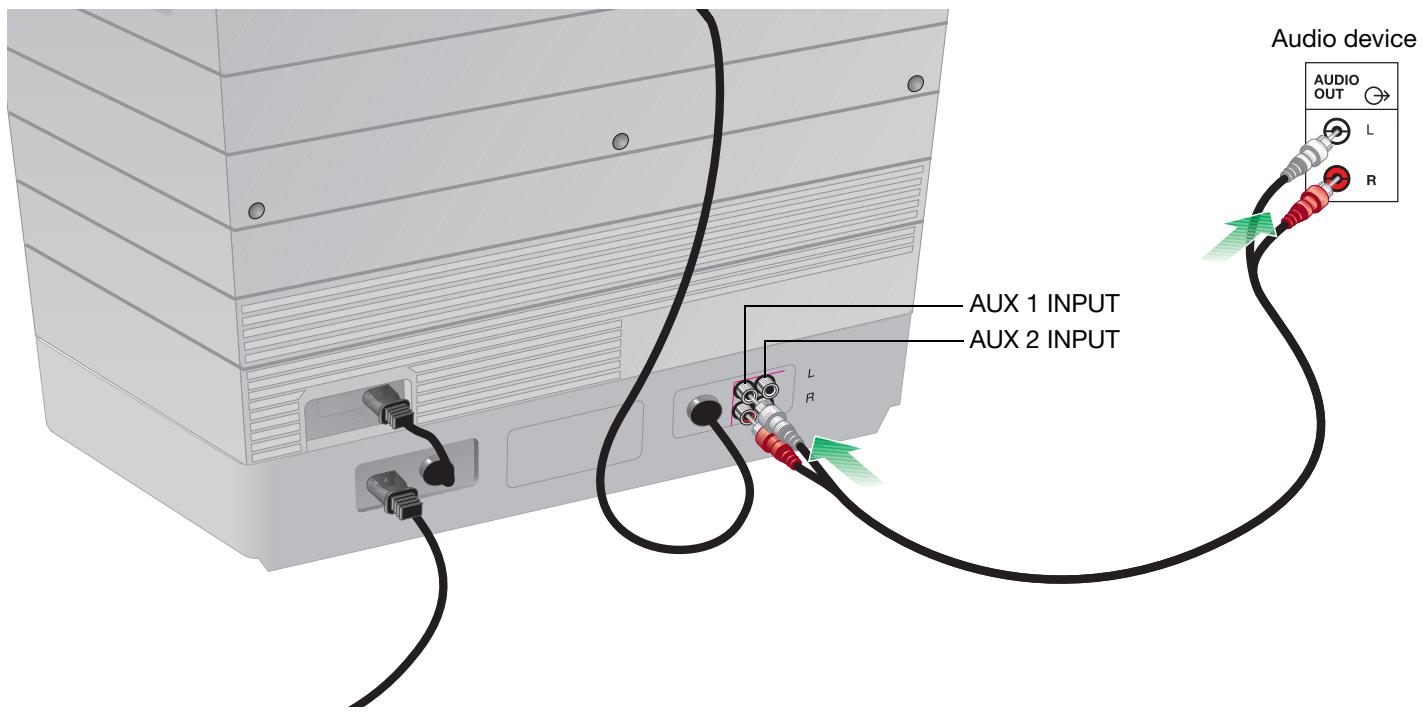
Figure 8
Playing a connected audio source
To listen to a connected source:
- Turn on the external audio device.
- Press AUX 1-2 on the Acoustic Wave® II CD changer remote control. Press AUX 1-2 again to switch between the AUX 1 and AUX 2 inputs. AUX 1 or AUX 2 appears on the display to confirm your selection (Figure 9).
- Adjust the volume using the remote control.
Note: The Acoustic Wave® II CD changer remote control cannot turn a connected AUX device on or off, or change its settings or selections.
Figure 9
Acoustic Wave® II CD changer sample AUX display

Replacing the remote control battery
If your remote control does not work properly, or its range of operation is reduced, it is time to replace the battery. Follow the instructions below:
- Place the remote control face down on a flat surface.
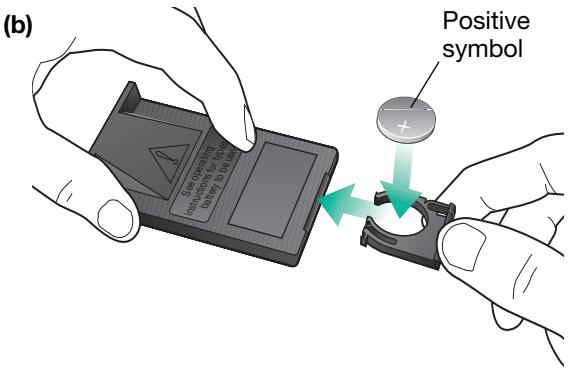
- Using your finger, push the tab lock to the side as shown and hold (Figure 10a). Slide the battery compartment open.
- Keeping the remote control face down, insert the new battery into the compartment with the + symbol facing up (Figure 10b).
- Gently slide the battery compartment closed. It locks automatically.
Remote control battery replacement
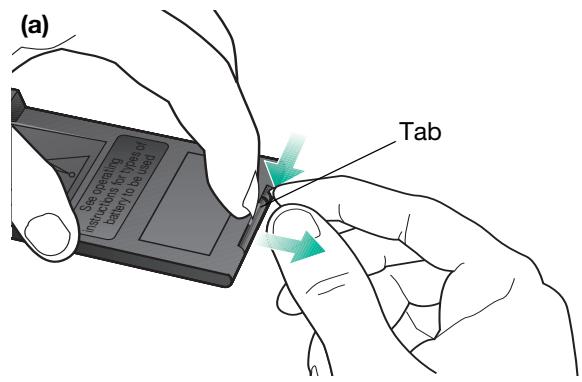
Figure 10
WARNING: Danger of explosion if battery is incorrectly replaced. Replace only with the same or equivalent type. Replace only with a lithium CR2032 or DL2032 3-volt battery by Duracell, Eveready, Energizer, Maxell, New Sun, or Toshiba (available from most electronics stores).
WARNING: Mishandling the remote control battery may cause a fire or chemical burn. Keep the battery away from children. Do not recharge, disassemble, heat above 212^ F ( 100^ C ), or incinerate the battery. Dispose of the used battery promptly and responsibly.
For more information, call Bose® Customer Service. Refer to the phone numbers on the inside back cover of this guide.
Troubleshooting
| Problem | What to do |
| No system operation | ·Make sure the power cord for the Acoustic Wave® II CD changer is completely plugged in both at the changer jack and at the wall outlet. |
| No sound or sound is muffled | ·If the Acoustic Wave® II CD changer or an audio device connected to it is playing, make sure that the “AUX” source indicator appears on the Acoustic Wave® music system II display. ·If the source is AUX 1 or AUX 2, make sure that the connected audio device is plugged in and turned on, and make sure the stereo cable is properly connected between the two units. ·Make sure that both the Acoustic Wave® II CD changer and the Acoustic Wave® music system II are plugged into functioning power outlets, and are turned on. ·Check the connection of the Acoustic Wave® music system II to the changer. Make sure the two RCA connectors are firmly inserted, red to red, and white to white, into the AUX IN jacks on the Acoustic Wave® music system II. Refer to “Making the connections” on page 6. ·Make sure nothing is blocking or preventing the IR signals emitted by the CD changer from reaching the receiver on the front of the Acoustic Wave® music system II. Refer to “Selecting a location for your music system and changer” on page 5. |
| CD skips | ·Make sure the system is in a location where it cannot get bumped. If so, move it to a more protected location. ·Check the CD for smudges or dirt. Wipe the CD (NOT in a circular pattern, but straight out from the center) to it clean off. |
| CD does not play | ·Make sure you have selected the CD changer. ·If you have selected the CD changer, make sure the AUX indicator appears on the Acoustic Wave® music system II display. If not, press the AUX button on the music system console. ·Make sure there is a CD in the selected CD changer slot. |
| A CD is playing, but none of the CD changer LEDs is lit | ·Check to see if the CD player in the Acoustic Wave® music system II is on and playing, instead of the CD changer. |
| CD changer does not eject a disc | ·Disconnect the system power cord from the AC outlet, wait a few seconds, and plug it in again. |
Customer Service
For additional help in solving problems, contact Bose® Customer Service. Refer to the address list on the inside back cover of this guide.
Limited warranty
What is covered:
All parts defective in material or workmanship.
For how long:
Two years (one year, Europe) from the purchase date.
What we will do:
We will, at our sole option, repair or replace any defective parts free of charge.
What you must do:
A. Call Bose® Customer Service and ask for shipping instructions.
B. Properly pack the unit, if possible, in the original carton for shipping.
Other conditions:
This limited warranty is fully transferable for the one-year period following purchase.
THE PROVISIONS OF THIS LIMITED WARRANTY ARE IN LIEU OF ANY OTHER WARRANTY, WHETHER EXPRESS OR IMPLIED, WRITTEN OR ORAL, INCLUDING ANY WARRANTY OF MERCHANTABILITY OR FITNESS FOR A PARTICULAR PURPOSE. BOSE CORPORATION'S MAXIMUM LIABILITY SHALL NOT EXCEED THE ACTUAL PURCHASE PRICE PAID BY YOU FOR THE PRODUCT. IN NO EVENT SHALL BOSE BE LIABLE FOR SPECIAL, INCIDENTAL, CONSEQUENTIAL, OR INDIRECT DAMAGES.
This limited warranty does not cover a defect that has resulted from improper or unreasonable use or maintenance, accident, improper packing, or unauthorized tampering, alteration, or modification as determined solely by us. This limited warranty is void if the label bearing the serial number has been removed or defaced.
Other Legal Rights:
This limited warranty gives you specific legal rights, and you also may have other rights that vary from state to state or country to country. Some places do not allow limitations on implied warranties or the exclusion or limitation of incidental or consequential damages, so the above limitations or exclusions may not apply to you.
Technical Information
Multi-disc changer power rating
222V-240V~ 50/60 Hz 80W (80W max., combined with the Acoustic Wave® music system II)
Dimensions
$$ 3 ^ {1 / _ {4}} \mathrm {"} H \times 1 8 ^ {\prime \prime} W \times 8 ^ {3} / _ {8} ^ {\prime \prime} D (8. 7 c m \times 4 5. 7 c m \times 2 1. 1 c m) $$
Weight
6.7 lb (3.1 kg)
Color
Graphite Gray or Platinum White
USA Customer Support
Bose Corporation, The Mountain
Framingham, MA 01701-9168
1-800-367-4008
Canada Customer Support
Bose Ltd., 1-35 East Beaver Creek Rd.
Richmond Hill, Ontario L4B 1B3
1-800-465-2673
European Office
Unit 3, 2 Holker Street,
Newington NSW, 2127
TEL +61 (0)2 8737 9999
FAX +61 (0)2 8737 9924
Deutschland
Postfach 1468
48504 Nordhorn
TEL 05921 3030 123
FAX 05921-724250
Bose AG
Hauptstraße 134
CH-4450 Sissach
TEL 061 975 77 33
FAX 061 975 77 44
Bose Ges.m.b.H
Wienerbergstraße 7
A-1100 Wien
TEL 01 604 043 40
FAX 01 604 043 423
France
Bose S.A.S
12 rue de Témara
F-78100 ST. GERMAIN-EN-LAYE
France
TEL 0820 820 995
FAX 0130616388
United Kingdom Customer Support
Freepost EX 151
Exeter EX1 1ZY
TEL 0800 614 293
FAX 0870 240 2013
Poland
Bose Sp. z o.o.
ul. Woloska 12
02-675 Warszawa, Poland
TEL (48-22) 852-2928
FAX (48-22) 852-2927
Nederland
Bose Electronics (Shanghai Co., Ltd)
2203-2205 22F, West Gate Tower
1038 West Nanjing Road
MeiLongzhen Plaza
Shanghai 200041,
Peoples Republic of China
TEL 86 21 62713800
Bose Hong Kong
Bose Limited
Suite 2410-11 Shell Tower
Times Square
1 Matheson Street
Causeway Bay, Hong Kong
TEL 852 2110 3330
Bose Taiwan
Worldwide House
Room 905, Floor 9
131 Min Sheng East Road
Section 3
Taipei, Taiwan
TEL 886 2 2514 7676
Bose India
Bose Corporation India Private Limited
4th Floor, Shriram Bhartiya Kala Kendra
1 Copernicus Marg
New Delhi 110 001, India
TEL 91 11 2307 3825 / 26 /27
India Toll Free: 1600 11 2673
Website: www.boseindia.com
Atlas Hi-Fi Pte. Ltd.
68 Orchard Road
03-19/21 Plaza Singapura
Singapore 238839,
Republic of Singapore
TEL 65-6-339-0966
The Asavasopon Co. Ltd.
50-52 Siphya Road
Mahaprudtharam, Bangrak
Bangkok 10500,
Thailand
TEL 66-2-234-6467
PT Audio Pratama
JL. Lodan Raya No. 1
Block CO/CN
Jakarta 14430,
Indonesia
TEL 62-21-659-8719
CSI Corporation
Seki Building
23, 2-Ga Namsan-Dong
Joong-Gu
Seoul 100-042,
South Korea
TEL 82-2-344-635-114
Eleksis Marketing Corporation
269 Connecticut Street
Greenhills East
Mandaluyong City
Metro Manila 1550,
Philippines
TEL 63-2-724-9566
G&M International LLC
P.O.Box 1229
Dubai, United Arab Emirates
TEL 971-4-2669-000
Sound Imports
Shop 40
The Mall of Rosebank
Cradock Avenue
Rosebank 2196,
South Africa
TEL 27-11-880-1933
World Wide Web
www.bose.com